|
|
|
|
|
|
|
|
|
|
|
|
|
|
|
| USER'S
GUIDE |
|
|
|
|
|
|
|
|
| LIST OF MANUALS |
|
|
|
|
|
|
|
|
|
|
|
|
|
|
|
|
|
|
|
|
|
|
|
|
|

|
|
|
|
|
|
|
|
|
|
|
|
|
|
|
|
|
When you click LIST OF MANUALS, the manual list
screen is displayed. |
|
|
|
|
|
|
The list of manuals lists
up all manuals contained in the DVD. |
|
|
|
|
|
|
|
|
|
|
|
|
|
|
|
|
|
|
|
|
|
|
|
|
|
|
|
|
|
|
|
|
|
|
|
|
When you click FANUC
Robot SAFETY HANDBOOK B-80687EN, for example, |
|
|
|

|
|
|
"FANUC Robot SAFETY HANDBOOK"
is displayed. |
|
|
|
|
|
|
|
|
When you click MAIN PAGE , the screen display
returns to the main page. |
|
|
|
|
|
|
|
|
|
|
|
|
|
|
|
|
|

|
|
|
|
|
|
|
|
|
|
|
|
|
|
|
|
|
When you click USER'S
GUIDE, this user's guide is displayed. |
|
|
|
|
|
|
|
|
|
|
|
|
|
|
|
|
|
|
|
|
|
|
|
|
|
|
|
|
|
|
|
|
| Bookmark
Function |
|
|
|
|
|
|
|
|
|
|
|
|
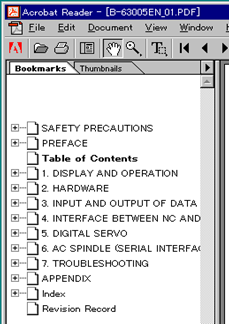
All manuals contained in
this DVD have bookmarks. |
|
|
|
|
|
|
On the left side of the
screen displaying a manual, bookmarks |
|
|
|
|
|
|
as indicated below are
displayed. |
|
|
|
|
|
|
|
|
|
|
|
|
|
|
|
|
|
|
|
|
|
|
|
|
|
|
|
|
|
|
|
|
|
|
|
|
|
|
|
|
|
|
|
|
|
|
|
|
|
|
|
|
|
|
|
|
|
|
|
|
|
|
|
|
|
|
|
|
|
|
|
|
|
|
|
|
|
|
|
|
|
|
|
|
|
|
|
|
|
|
|
|
|
|
|
|
|
|
|
|
|
|
|
|
|
|
|
|
|
|
|
|
|
|
|
|
|
|
|
|
|
|
|
|
|
|
|
|
|
|
|
|
|
|
|
|
|
|
|
|
|
|
|
|
|
|
|
|
|
|
|
|
|
|
|
|
|
|
|
|
|
|
|
|
|
|
|
|
|
|
|
|
|
|
|
|
|
|
|
|
|
|
|
|
|
|
| Search
Function |
|
|
|
|
|
|
|
|
|
|
|
|
The currently opened
file can be searched for a desired word.
Three methods of using the search function |
|
|
|
are available. |
|
|
|
|
|
|
|
|
|
|
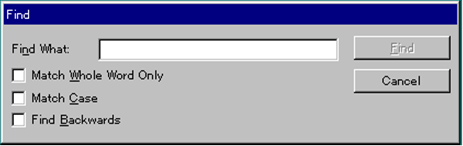
Method 1 Choose Edit -> Find from the
toolbar. The Find dialog box is
displayed. |
|
|
|
|
|
|
|
|
|
|
|
|
|
|
|
|
Method 2 Click the button |
|
in the toolbar. |
The Find dialog box is displayed. |
|
|
|
|
|
|
|
|
|
|
|
|
|
|
|
|
|
|
|
|
|
|
|
|
|
|
|
|
|
|
|
|
|
|
|
|
|
|
|
|
|
|
|
|
|
|
|
|
|
|
|
|
|
|
|
|
|
Find dialog box |
|
|
|
|
|
|
|
|
|
|
|
|
|
|
|
|
|
|
|
|
|
|
|
|
|
|
|
|
|
|
|
|
|
|
|
|
|
|
|
|
|
|
|
|
|
|
|
|
|
|
|
|
|
|
|
|
|
|
|
|
|
|
|
|
|
|
|
|
|
|
|
|
|
|
|
|
|
|
|
|
|
|
|
|
|
|
|
|
|
|
|
|
|
|
|
|
|
|
|
|
|
|
|
|
|
|
|
|
|
|
|
|
|
|
|
|
|
|
|
|
|
|
|
|
|
|
|
|
|
|
|
|
|
|
|
|
|
|
|
|
|
|
|
|
|
|
|
|
|
|
|
|
|
|
|
|
|
|
| Enlargement
Function |
|
|
|
|
|
|
|
|
|
|
|
|
|
|
|
|
|
|
|
|
|
|
|
Procedure |
|
|
|
|
|
|
|
|
|
|
|
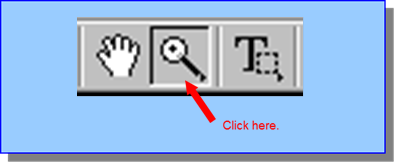
1. Click the button
indicated below in the toolbar. |
|
|
|
|
|
|
|
|
|
|
|
|
|
|
|
|
|
|
|
|
|
|
|
|
|
|
|
|
|
|
|
|
|
|
|
|
|
|
|
|
|
|
|
|
|
|
|
|
|
|
|
|
|
|
|
|
|
|
|
|
|
|
|
|
|
|
|
|
|
|
|
|
|
|
|
|
|
|
|
|
|
|
|
|
|
|
2. The cursor changes to |
|
|
|
|
|
|
|
|
|
|
|
|
|
|
|
|
|
|
|
3. Move the cursor |
|
to the portion to be
enlarged, then click. |
|
|
|
|
|
|
|
|
|
|
|
|
|
|
|
|
|